The Refrigerator Saga

Last January (2023) I noticed some cracking on the interior plastic of my refrigerator. The fridge still worked but I hated looking at the cracks and at the time we had no clue as to what had caused them. Knowing that I want to sell this trailer some day I decided to replace the refrigerator. Watching the videos on YouTube showed that it wasn’t that complicated. So I ordered a refrigerator and then had it shipped to my house. I hired a mobile RV tech and we gave it a go.

We got the old refrigerator out of it’s cubby hole and then tried to get it out the front door. We couldn’t. There is a sharp, narrow 90 degree bend to get around the kitchen cabinet and out the door of the trailer. Try as we might we just couldn’t do it. I helped him put everything back and gave Lance Parts and Service a call. The appointment was 3 months away and I had to ship the fridge down to Lancaster, CA where they were located. That turned out to be another whole blog post. Let’s just say, I finally got it down there.

We told them we would be arriving the night before so we could be there in time for the 7am appointment. They said we could stay in their parking lot where they had electrical and water hookups. We took advantage of the electrical, didn’t need the water. The drive down was fairly exciting, just a normal day on Highway 99 and the Tehachapi Pass.

We spent the evening in their parking lot but they have wonderful landscaping so it felt more like an RV park. Also, the temps were low enough that we didn’t need the AC. We sat out in the grass and enjoyed the cool evening breeze before turning in. We dropped the trailer off at the service location which is basically the delivery entrance for the manufacturing plant. It took an hour to get it all checked in. The lady at the service counter said she’d call me when it was done.

It took them longer than they expected because the fridge was the same width but slightly shorter. They didn’t want to give it back to me with a gap above the fridge so they had to fab up a new piece to close the gap. That meant it would take an extra day.

Sidebar: The lesson I learned was that I should have ordered the replacement refrigerator through Lance. That way it would have fit the existing cutout. I tried to save a few bucks by doing it myself and ended up paying more. Lesson learned.

Cristy and I had to stay at a hotel over night so we chose one next to food and shopping down in Palmdale. I have to admit it was kind of cool to see the Lockheed Skunkworks hangars. I thought they would be a bit more secretive. The two Lockheed Martin hangars dominate the landscape. The next morning at breakfast I got a call from the Lance service department that the trailer was ready. That was good news as I thought we wouldn’t get that call until late afternoon. We finished breakfast and drove back up to Lancaster.

When we went to pick up the trailer we found they just left it right outside the gate.  Barely any room to maneuver my truck to hitch up.  No place to turn around.  They expected me to back out past two parking lot entrances and out onto the main road.  With the way people drive down there I told them no way.  I asked them to turn the trailer around.  They ended up moving it out into the turn lane in the center of the street. 

So what are my thoughts on the whole experience?  Lance did swap out the fridge and did a good job fabbing up the new wood surround.  The fridge was the same width but a bit shorter and they finished it off nicely. The door swung the wrong way.  I asked them why they didn’t go ahead and reverse the door swing so it would match the old refrigerator. I basically got a “not our job” answer from them.  They then told me the door isn’t reversible anyway.  Uh-huh.  I reversed the door this morning with zero experience.  Took me about 30 minutes.  They could have done it in 10.  Not a huge deal but geez.

I also asked them to look at the gap between the bathroom wall and the ceiling.  They said it didn’t look right but didn’t look like a huge problem either.  If I want them to investigate why it happened I’d have to bring the trailer back at another time and leave it with them for a day while they measured things.  Okay, we may do that.  I’m also going to take a picture of the gouge they put in the door frame when they swapped the fridge.  They can fix that next time too.

So I guess I expected more from them.  Maybe I expected too much.  I feel like it was the same service level I get at the DMV.  Just… basic stuff.  No going out of their way to make the customer happy.  Just doing EXACTLY what the customer asked and no more.  Okay.  That’s fine.

I really like our 1995 travel trailer.  We enjoy travelling in it. That being said the customer service is lackluster.  We will probably not be a repeat customer.  We will be wanting something bigger next time anyway.
Managing Guest Wireless at a Hospital

Note: The target audience of this article is other computer networking professionals. If there are terms and concepts you don’t understand either Google them or press the “I believe” button and move on. 🙂

One of the first projects I had when I was hired at San Joaquin General Hospital was to implement a wireless network for hospital visitors and patients. There was an existing guest wireless network on the old wireless controller but since we were installing a new wireless controller it was the perfect opportunity to come up with a new solution. The main objectives of the new installation were:

  • Allow guests to access the Internet
  • Prevent guests from accessing internal networks and resources
  • Easy to manage

The existing architecture of guest wireless used an existing VLAN and IP address that was part of our internal network. To prevent the guest users from accessing internal resources there was a combination of Access Control Lists on our internal routing infrastructure and the wireless controllers. The average person wouldn’t be able to cause any harm with this configuration but a good hacker could probably hop to a different VLAN and begin wreaking havoc on our internal resources. This made the existing configuration both difficult to manage (multiple ACLs on multiple devices) and insecure.

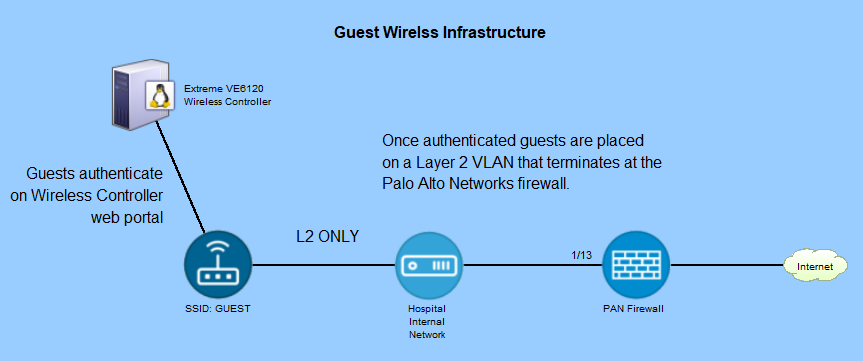
I elected to leverage our new Palo Alto Networks firewall to replace the multiple ACLs on the different devices. I removed the IP address from the existing VLAN by deleting it from the core router. I then moved it to the PAN firewall. So at this point there was no Layer 3 addresses on the VLAN within our switching infrastructure. It existed only on the PAN firewall. I then set up a DHCP server on the firewall and used an IP address scheme that was not routable on our internal networks (192.168.x.x). I also configured DHCP to set Google’s DNS servers in the DHCP client config.

Next was setting up the security policy on the firewall that would only allow DHCP from the firewall to the wireless clients, and then only allow them to go out to the Internet. Since the IP addresses handed out by DHCP are not routable on our internal network, there was no need to set up ACLs. Once the security policies were in place I tested DHCP and the security rules by plugging my laptop into a network port that was on the Guest Wireless VLAN. My laptop received a 192.168.x.x IP address from the firewall and I was able to get to Google and Yahoo on my laptop. I checked a few other websites to make sure Internet access was working as expected.

The last step was setting up Guest Wireless on our wireless controller. We set it up so that when they join the Guest Wireless network, they are redirected to a web portal page that displays legal disclaimers and terms of service that the guest user has to accept by clicking on an okay button. This is available out of the box with our Extreme Networks wireless controller. I did change the header image and web page colors to match our hospital branding. There are controls to do this on the web portal’s configuration pages. Once everything looked the way I wanted it I saved the Guest portal page configuration. A nice feature of Extreme Networks’ wireless controller is that when clients connect and get the portal page, at that point they are just tunneled directly to the wireless controller and don’t even have an IP address yet. Until they click “I accept” to the terms and conditions they are going nowhere.

After enabling Guest Wireless on my local access point I tested it. I connected to Guest Wireless and was re-directed to the portal page. I clicked “I Accpt” to the terms and conditions and then was redirected to the Internet. I then tried to access internal resources but was not able to get to anything but the Internet. Success. I then enabled the Guest Wireless network on all the other APs at the hospital and watched to see if guests started connecting. It was almost immediate. I checked the firewall logs and I could see that they were accessing the Internet with no problems.

An added bonus of putting a non-routable Layer 3 address on an internal VLAN is you can connect wired machines to just as easily. If vendors show up and need wired access to the internet I put them on the Guest Wireless VLAN on whatever network port they are on. This allows them to access the Internet and they can connect to whatever they need to (their workplace VPN, email, etc) from there. They do not get the Guest Portal page as they are not connecting to the wireless controller at all.

So that’s how I set up Guest Wireless at my workplace. Granted it’s not a step-by-step how-to on guest wireless services but can serve as a framework on which you can base your own implementations. Relatively easy, simple, and pretty secure.